QuickBooks offers you a list of latest and advanced tools. You can also use QuickBooks outlook after integrating it with the QuickBooks which is used to send emails and receive emails. However sometimes QuickBooks outlooks may take some issues and it can be due to various reasons, which can be anything, it can be due to improper setting, missing files, etc. The below article covers the explanation of QuickBooks’s outlook on its causes and resolutions.
What is QuickBooks Outlook Error?
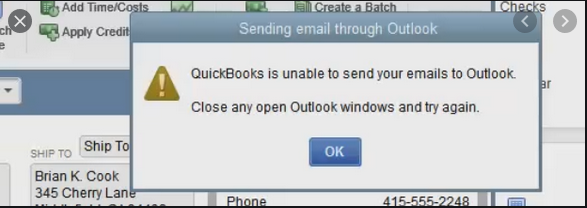
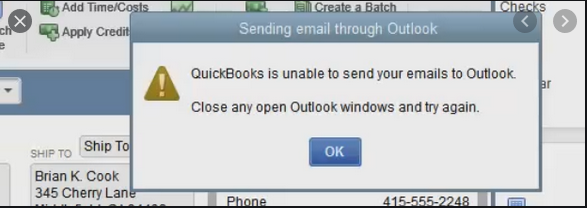
MS Outlook is can be used after integrated with the QuickBooks to use the outlook for sending emails, receiving the emails, and use it as an email client. However, when the Outlook error comes it also shows you the error message on the screen which can be as “Error: QuickBooks is unable to send your email to Outlook“. This error can be due to wrong settings of internet explorer preference or Email.
Causes of the QuickBooks Outlook not Responding
When the error comes it may be a result of many reasons as mentioned below :
- Installation of Outlook is not properly on Windows
- IE incorrect settings did
- Damage QuickBooks installation
- Outlook application running in the background can also lead to the error if while running you try to open the email from QuickBooks
- Wrong email settings in QuickBooks application
- Damaged email outlook configuration for file MAPI32.dll
Once you know the reasons the next steps are to follow the steps to resolve the QuickBooks Outlook error.
Steps to Resolve the QuickBooks Desktop Outlook is not responding issue
Users can follow the below steps to get rid of the QuickBooks desktop outlook error. Let’s find out the solutions.
Total Time: 35 minutes
Method 1 – Through Unchecking the Option “Run this Program as Administrator”
This solution helps you to change the admin priorities as it is not required while sending the email
💠 First, close the QuickBooks and click on the Windows start menu
💠 Now in the search box type the QuickBooks
💠 Once finding the QuickBooks right-click on QuickBooks icon and select Open file location
💠 Now get the QuickBooks.exe file from the folder under the company file, do the right-click and select properties
💠 Now select the compatibility, then select and uncheck the option “Run this program as an administrator”
💠 Select show settings for all the users to view the option back in case you are not able to checkmark the option
💠 Click apply and ok to save the changes made
Now check if the error still comes, if yes then go to next step
Method 2 – Change the Email Preferences in QuickBooks
With this method, you can change the QuickBooks email preferences for the outlook and then try again to send the email
💠 Go to Edit tab >>> click on preferences >> > select send forms
💠 Now select My preferences tab >>> select to send email using the option
💠 Click on OK and go to edit tab again to click preferences
💠 Choose select send forms >>> click QuickBooks email under the preferences tab
💠 Click on OK
💠 Edit the preferences to the outlook and click ok to save and confirm the change
💠 Check if the error persists
Method 3 – Check the IE Email Preferences
💠 Close QuickBooks and open the Internet explorer
💠 Go to Tools >>> settings >>> Internet options
💠 Choose the programs tab and select a set program
💠 Now select the options set your default program, then select the email service you want to use
💠 To save the changes click on Ok and click on apply
💠 Finally, close the internet explorer
Method 4 – Repair your MAPI32.dll
💠 Still, if the above error does not resolve you need to try this one
💠 First, close all the programs running in the background
💠 Open the Windows File manager >>> go to C:\Windows\System 32 folder
💠 Search the Fixmapi.exe file and once it is found do double click the same
💠 Now it will repair the MAPI32.dll file and wait for the process completion, once done try to send the email from QuickBooks
Contact
For any clarification or assistance visit accountingguide.co and do the live chat with the QuickBooks professionals. QuickBooks team is available 24*7 to assist you with all the possible resolutions. QuickBooks technicians are polite, quick listeners and certified. They are having years of experience in the same domain. You can also call on QuickBooks technical support phone number 1800-910-4754 or fill the contact form to get assistance from the QuickBooks professionals anytime.